
indieVelo—Trainer Feel and Virtual Gearing Explained

Enhance the virtual cycling esports experience: Understanding indieVelo's Trainer Feel and Virtual Gearing features.

In virtual cycling esports, the experience is as much about immersive engagement as it is about the physical training for some. indieVelo offers a high degree of customization that allows cyclists to finetune their trainer feel, creating an environment more closely mimicking real-world conditions and adaptable to a rider’s goals.

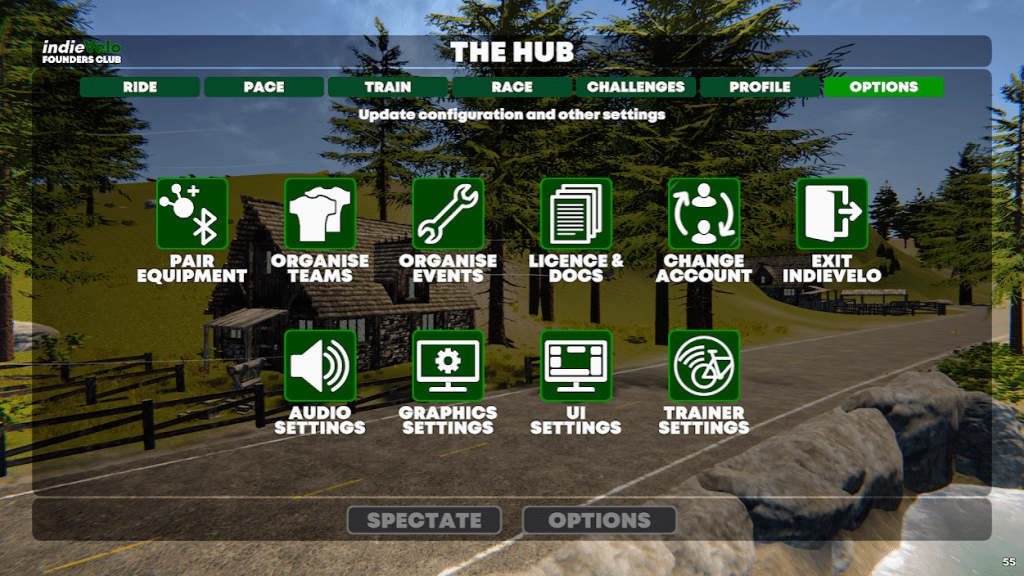
indieVelo hub

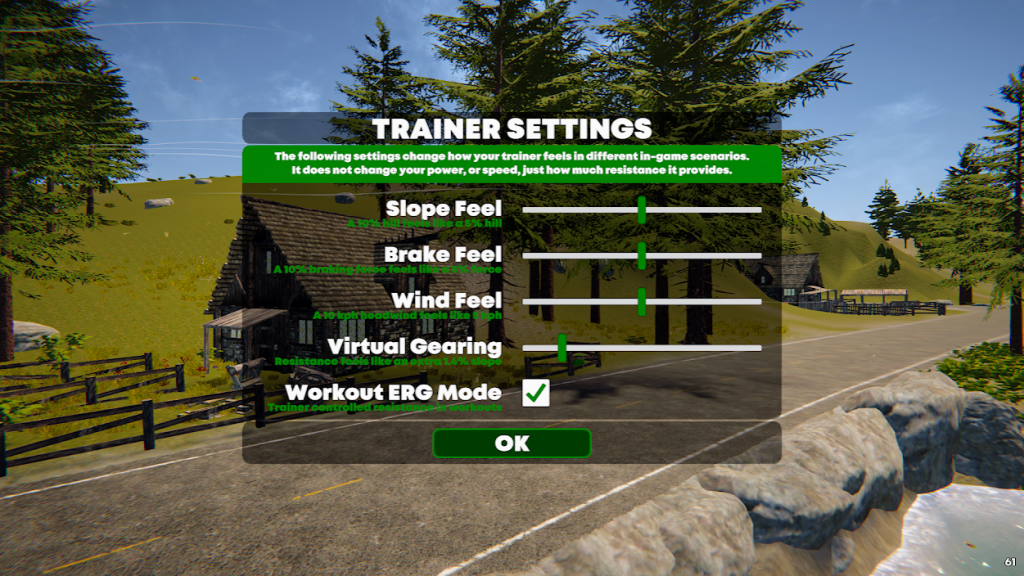
These settings, encompassing aspects like Slope, Wind, Draft, Virtual Gearing, and Workout ERG mode, are easily adjustable in the Trainer Settings menu in The Hub. The HUB>Options>Trainer Settings

indieVElo hub profle

Although adjusting these parameters doesn’t directly affect your avatar’s speed in the game, they influence the resistance you experience from your smart trainer, profoundly impacting the “feel” of your ride.

indieVelo Trainer settings

Slope Feel

The Slope Feel setting lets you determine the degree of terrain resistance your smart trainer emulates. For instance, setting it at 50% causes a 10% gradient climb to feel more like a 5% gradient climb. It’s an effective tool to control how intensely you want to train on virtual hills and descents.

Changing Slope Feel doesn’t change the power needed to climb the hill. You still have to put out the same watts to move the same distance as before, but you’ll do it in a different gear.

Riding Tip #1: If you’re preparing for a real-life event with considerable gradients, gradually increase your slope feel over time. This training strategy can train your muscles and cardiovascular system for challenging ascents.

Riding Tip #2Try decreasing your slope feel if you’re running out of gears and spinning out on descents. It will make the gradient seem less steep and make putting power to the pedals on downhills more effective.

Brake Feel

Brake Feel is an indieVelo feature simulating resistance when auto braking is active, notably around corners. In indieVelo cornering matters. The game’s physics engine determines the fastest speed you can safely take through a corner without losing traction, whether on the flats or while descending.

If you exceed that velocity, the game increases the resistance to your trainer as it slows you down. A higher value intensifies the resistance you experience during active avatar deceleration and when reaccelerating out of the curve.

Riding Tip: Mastering turns takes practice. Use the mini-map and be alertly prepared for upcoming tight corners. Watch for the brake lights of the avatars ahead. Reduce speed entering the curve and power through the apex for the sweetest line.

Wind Feel

Wind and weather introduce a dynamic element to indieVelo virtual riding, simulating the changing wind speed and direction encountered on the road. Adjusting the Wind Feel setting allows a rider to vary their trainer’s resistance relative to the simulated environmental factors. At a 50% setting, a 10kph headwind feels more like a 5kph headwind—and similarly for a tailwind.

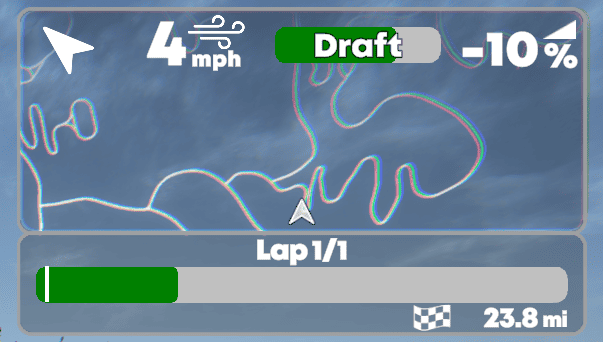
Riding Tip: Constantly monitor the wind direction and the draft monitor to find the optimal position in the group. Much like in real life, minimizing the amount your nose is in the wind could be the difference between victory and defeat.

indieVelo How-to-Guide Wind and Weather

Virtual Gearing

Virtual Gearing is a digital cassette allowing riders to tweak resistance without shifting gears. Like the “Trainer Difficulty” setting on other virtual cycling platforms, virtual gearing lets riders switch gears without physically choosing another cog. 

By simulating the addition or subtraction of teeth to your front chainring, it varies the resistance sources for finer control. It can come in handy to optimize your chainline-avoiding the dreaded cross-chaining.

The concept of chainline becomes particularly important when considering the efficiency and longevity of your drivetrain. When your bike’s chainline is straight, or nearly straight, the chain can move smoothly between the gears, resulting in efficient power transfer and minimal wear on the drivetrain components.

indieVelo virtual gearing 0.0
The Virtual Gearing indicator on the user interface to left of the mini-map (shown as 0.0% here).

indieVelo optimizes the ease of functionality by allowing riders to adjust the virtual gearing setting on the fly using the (+) and (-) keyboard buttons. Or the Res up or Res down buttons located on the right end of the third row of the VLOMote main screen.

Unlocking the potential of virtual gearing is a fantastic way to simulate more challenging gear ratios without needing a larger cassette on your trainer. On the flip side, if you’re spinning out on a descent, reach over to your keyboard and bump the gearing up a bit. For those times when it’s a challenge to find the sweet spot in your cadence, tinker with virtual gearing for subtle shifting adjustments.

Riding Tip: Use this feature when training for flat, high-speed scenarios or mimicking a ride with significant climbs. Virtual Gearing allows you to adapt to various terrains without physically changing your bike’s setup.

indieVelo virtual gearing 9.0
Virtual Gearing ranges from 0.0% to 9.0% by increments of .2%

Also Read:Keyboard Shortcuts

Workout ERG Mode

ERG Mode comes into play when a set wattage target exists in the workout mode. It automatically adjusts resistance, ensuring you consistently hit the indicated target power. This feature is particularly useful for structured training, allowing for precise power-based workouts.

Riding Tip: Utilize ERG mode for interval training or specific power zone workouts to maintain accurate and consistent efforts. indieVelo supports ZWO and ERG workout files. Place your own custom workouts in the indieVelo Workouts folder in Windows documents before you launch the game and they will be waiting for you in The HUB>Train.

Conclusion—indieVelo Trainer Feel and Virtual Gearing

The indieVelo virtual cycling esports platform offers cyclists a highly immersive and adaptable training environment backed by physics and designed to replicate real-world conditions. From customizing slope feel to honing your skills in handling virtual cornering and understanding the benefits of wind positioning, each setting enhances your overall cycling realism. Experiment with these settings to find what works best for you, and embrace the potential of virtual cycling esports realism with indieVelo.

Subscribe
Notify of
guest

5 Comments
Inline Feedbacks
View all comments
Scott Baker
Scott Baker
2 years ago

Where is the VLOMote app?

Andreas Mergenschröder
1 year ago

I have a question about virtual shifting. On my Macbook, I can use the (-) key to shift down the gears. But I can’t shift up the gears with the keyboard. The (+) key does not work. The description says (+/=) what does this mean?
Is there a way to configure the keyboard commands myself? 

Just Riding Along
Just Riding Along
1 year ago

>What description are you referring to that says “+/=“? I’m not familiar with that configuration.

In game go to Options>License & Docs>Controls. You’ll see it listed there for “increase base trainer resistance”. “+/=”, or perhaps more correctly “=/+”, is the key to the left of backspace on a US keyboard layout.

I don’t have a solution for OP’s problem. “=/+” works as expected on Windows and I don’t have a Mac. I would suggest trying they key in combination with Shift, CMD, alt, or Option to see if one of those works.

Latest Podcast!

Virtual Velo Podcast New Episode Mary Kate McCarthy and Dylan Kennett
Check out Episode 86 here!
UCI Cycling Esports World Championship LiveBlog
Click to join the fun!

Latest Posts!

Use code ZOMM50 at checkout for $50 off your Velocity Rocker Plate order exclusively for our followers!

Wahoo Run Smart Treadmill
Click the image to be one of the first to get the revolutionary Wahoo Run Smart Treadmill!
Zwift ride frame
Click for complete line of Zwift Bikes!

Do you want to join the VVN team? Tap the logo for details!

The Zommunique’ Community gets 10% off at LEVELVelo.com with coupon code “TheZomm gives 10% off”   

Broadcast Partner to The Virtual Velo Network!

The DIRT Dad Fund

Contribute to a great cause!

The DIRT Dad Fund

Share the power of The DIRT Effect

Click to see the full Zwift product line!

Jaclyn Long, MFT

Certified Yoga & Mindfulness Teacher

Marriage & Family Therapist in CA

Sports Anxiety Therapy

Purchase your Zwift Play controllers here!

5
0
Would love your thoughts, please comment.x
()
x
The Zommunique
Privacy Overview

This website uses cookies so that we can provide you with the best user experience possible. Cookie information is stored in your browser and performs functions such as recognising you when you return to our website and helping our team to understand which sections of the website you find most interesting and useful.