A how-to-guide to interact with the virtual cycling esports platform indieVelo from your phone for text chat and other essential features.
First and foremost—a disclaimer.
I have no personal or financial interest in the following app suggestions in any shape or form, it is merely to help out.
I have searched high and low for an app that would do what I need it to do in indieVelo since a “companion app” is not in the works and has no ETA at this time.
I have finally found what I was looking for, and I will help you through it all. Right here. Right now!
On the devices you use to run indieVelo from, you want to do the following steps:
Download the app called “PC Remote” on your phone.
Download the receiver on the PC you are using to RUN indieVelo. From the following link: https://www.monect.com/#download
Choose a way to connect the two devices—BLE or Wi-Fi. I’m connected via Wi-Fi myself. Make sure both devices are on the same network if using Wi-fi.
Open “PC Remote Reciever” on your PC if it’s not already open, and connect to your phone.
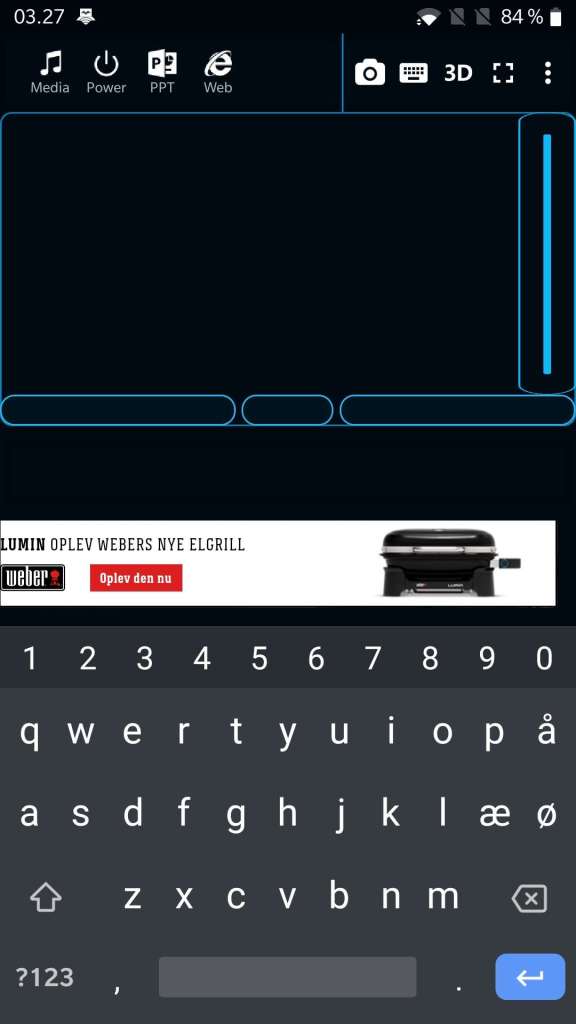
On your Phone, you should now have a screen looking like Screenshot 1.
This is where things start to happen. To get to Screenshot 2, you click the keyboard icon in the top right corner. And after that, to reach Screenshot 3, and get rid of the annoying ad in the middle of the screen, you simply click the “enlarge” square next to the 3D icon.
Also Read: How-to-Guide-NVIDIA Control Panel Settings
Now you are good to go, and your phone will now serve you as a mouse and keyboard, where the top half of your screen will function as a touchpad, and the bottom half, as a keyboard.
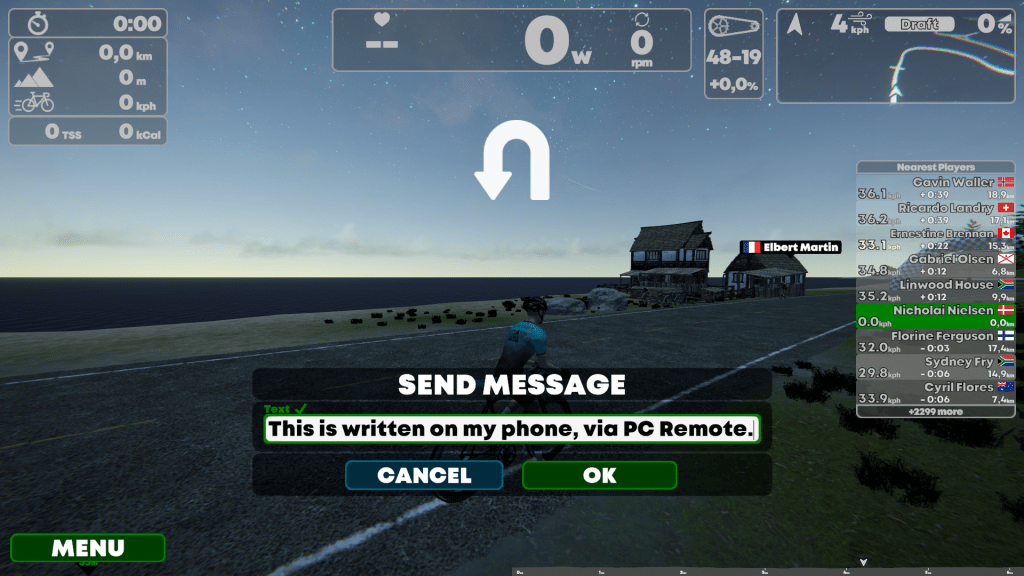
Every function in indieVelo is now available at your fingertips, even if you do not have a keyboard in reach. For example, clicking “M” on your phone will open the messaging feature, and you can text directly from your phone and click send, and the world will see it, just as if you had been using a keyboard.
Footnote: There is no ESC key in the app with this current layout, so should you need one, click the three dots next to the enlarge button, click typewriter keys, click ESC, and go back.
Also Read: How-to-Guide-Keyboard Shortcuts
Contribution courtesy of Beta-tester Nicholai Nielsen [+R]. Thanks Nicholai!
Check out indieVelo—How-to-Guides for more helpful tips and tricks!
Semi-retired after more than 20 years as the owner and director of a private Orthopedic Physical Therapy practice, Chris now enjoys the freedom to dedicate himself to his passions—virtual cycling and writing.
Driven to give back to the sport that has enriched his life with countless experiences and relationships, he founded a non-profit organization, TheDIRTDadFund. In the summer of 2022, he rode 3,900 miles from San Francisco to his “Gain Cave” on Long Island, New York, raising support for his charity.
His passion for cycling shines through in his writing, which has been featured in prominent publications like Cycling Weekly, Cycling News, road.cc, Zwift Insider, Endurance.biz, and Bicycling. In 2024, he was on-site in Abu Dhabi, covering the first live, in-person UCI Cycling Esports World Championship.
His contributions to cycling esports have not gone unnoticed, with his work cited in multiple research papers exploring this evolving discipline. He sits alongside esteemed esports scientists as a member of the Virtual Sports Research Network and contributes to groundbreaking research exploring the new frontier of virtual physical sport. Chris co-hosts The Virtual Velo Podcast, too.
Thanks! Any idea if this is a windows only thing or will it work for mac as well? (Before i go trying it, I thought I would check!)
Hi Marc
I am the guy who initially put this together, – i don’t know if it works on Mac, but considering the name is “PC Remote” i doubt it, – but i’m ready to be proven wrong. 🙂
Hi, I created Indievelo Remotes. One for Workouts, and another for Cameras. If you’re interested, let me know
Wow, Roy! That looks awesome! I saw your post in the Facebook group also. Are you interested in putting a Google doc together? I’ll post it to the website. If so, message me at TheZommunique@gmail.com